
Medicare agents still use spreadsheets because their CRM does not track commissions at the policy level. Approximately 73% of insurance agents rely on spreadsheets for critical tasks like commission tracking — not because spreadsheets are better, but because most CRM platforms treat commissions as a reporting layer rather than tying them directly to each policy record. The spreadsheet fills the gap the CRM left open.
Running a spreadsheet alongside your CRM is not a workflow choice. It is a diagnostic signal: your CRM is not doing its full job.
Source: Google AI Mode response to "what Medicare-specific CRM is best for managing a book of business," April 2026. The commission workflow described on this page is what distinguishes KundPro's approach from platforms that treat commissions as a reporting layer.
How Medicare agents track commissions (simple explanation)
Medicare agents track commissions by recording the expected commission and payment date when a policy is written, then comparing that expected amount to the actual payment received from the carrier. Each policy is tracked individually — creating a line-by-line ledger where discrepancies can be identified and corrected. This process applies to both first-year commissions (NFYC) and renewal commissions, using the same expected-versus-actual structure for every entry.
Ask any experienced Medicare agent whether they use a spreadsheet. Most will say yes — and then immediately explain that they also have a CRM. That combination is the tell. It means their CRM handles some things and the spreadsheet handles the rest, and the agent is manually maintaining both.
That is not a workflow. That is two incomplete systems held together by the agent doing the work of connecting them. And it is the most reliable sign that the CRM was not built for how Medicare business actually works after the sale.
The real reason Medicare agents use spreadsheets (it is not what most articles say)
Most articles about insurance agents and spreadsheets focus on the same three reasons: cost, familiarity, and flexibility. Those factors are real for agents who are starting out and have not yet invested in a platform. But they do not explain why agents who already have a CRM are still maintaining a spreadsheet alongside it.
The reason experienced Medicare agents run both systems simultaneously is simpler and more specific: their CRM does not track commissions at the policy level, so they built a spreadsheet that does.
This is not about cost. A $75 per month CRM subscription is already a sunk cost. This is not about familiarity. The agent already knows how to use the CRM. This is about a specific functional gap: the CRM stores contacts and policies but does not record what each policy is generating in NFYC and renewal commissions, tied directly to that policy record, in a way the agent can actually use for reconciliation.
Reason 4 is the one most discussions miss. It is also the one that explains why the spreadsheet persists after the agent has paid for and learned a CRM. The CRM solved some problems. The spreadsheet solves a different one it left open.
Why Medicare commission tracking is more complex than most insurance lines
Medicare commission complexity is not just a volume problem — it is a structural one. Understanding why Medicare agents specifically struggle with spreadsheet management requires understanding what they are actually tracking.
- Multiple products per client, multiple carriers per product. A single Medicare client may hold a Medicare Supplement through one carrier, a standalone Part D drug plan through a second carrier, a dental plan through a third, and a hospital indemnity policy through a fourth. Each generates separate commissions on separate schedules with separate first-year versus renewal rates. That is four carrier relationships per client — multiplied across hundreds of clients.
- NFYC versus renewal commission distinction. Medicare commission structures distinguish between first-year commissions (NFYC) and renewal commissions, which may differ significantly. CMS sets allowable renewal commission rates annually, and those rates can change from year to year. An agent managing a mature book needs to track both the NFYC paid in the enrollment year and the renewal commission paid in each subsequent year, per policy, per carrier.
- Carrier statement format fragmentation. Every carrier delivers commission statements in a different format, on a different schedule, with different line-item conventions. Reconciling what is owed against what was paid requires going line by line across multiple statement formats — which is exactly what spreadsheets are good at and what most CRM platforms cannot do natively.
This is why Medicare agents specifically are more dependent on spreadsheets than agents in most other insurance lines. The commission structure requires tracking that most CRMs were never designed to support at the granularity that Medicare actually requires.
What running two systems actually costs a Medicare agent
The cost of maintaining a spreadsheet alongside a CRM is not just the time spent updating it. The real cost shows up in three places most agents do not quantify until they have already been paying it for years.
Most agents don't realize this until it's too late — the spreadsheet becomes the real system, and the CRM becomes where data goes to die.
your commissions
a checkbook you can balance —
per policy, per carrier
Why some agents trust their spreadsheet more than their CRM (the black box problem)
One reason the Google AI result flagged but most articles do not explain honestly: some agents use spreadsheets not because they have to, but because they prefer them. Specifically, because they trust a spreadsheet they built themselves more than a commission module they cannot see inside.
This is a rational response to a real problem. Most CRM commission modules are opaque. You enter data, it produces a number, and you are expected to trust the number. When a carrier pays an unexpected amount, the agent cannot easily tell whether the CRM is right and the carrier is wrong, or whether the CRM has a formula error or a data entry problem of its own. The spreadsheet, by contrast, is transparent. Every formula is visible. Every number traces back to a cell. If something is wrong, the agent can find it.
| What agents value in a spreadsheet | What this tells us about what a CRM must do |
|---|---|
| Full visibility into every formula | The commission module must be transparent — expected amount, actual amount, and the difference, visible side by side per policy, not buried in a report |
| Line-by-line carrier statement matching | The CRM must support reconciliation at the same level of detail the spreadsheet does — one entry per policy per carrier, not an aggregate total |
| The ability to find and fix an error | Commission entries must be editable in the system where they live — not locked in a report that has to be regenerated after a correction |
| Control over what gets entered and when | The agent should enter expected commissions when a policy is written, then enter actual amounts when received — maintaining the same audit trail the spreadsheet provided |
The agents who trust their spreadsheet more than their CRM are not being irrational. They are responding to CRM commission modules that earned that distrust by being opaque, aggregate, and hard to audit. The answer is not to automate commissions into a black box. It is to give agents the same line-item visibility and control the spreadsheet gave them — inside the system where the policy actually lives.
The spreadsheet as a diagnostic tool (not a habit)
Here is a reframe that changes how most agents think about this question: the spreadsheet is not a legacy habit. It is a diagnostic instrument. It exists because something in the agent’s stack is not working correctly — and the agent built the spreadsheet to compensate.
When a Medicare agent is maintaining a spreadsheet for commission tracking, they are telling you exactly what their CRM cannot do. Read the spreadsheet columns and you read the CRM’s gaps.
| If the spreadsheet is tracking… | The CRM is missing… |
|---|---|
| NFYC and renewal commissions per policy | Policy-level commission tracking — the CRM stores the policy but not what it generates |
| Renewal dates by policy | Policy-level renewal tracking — the CRM has one date per contact, not one per policy |
| Which carrier paid, when, and how much | Commission reconciliation against carrier statements — the CRM shows a total, not a line-item audit |
| Clients missing a product type | Book-of-business prospecting — the CRM cannot query across the book to surface coverage gaps |
| Commission history year over year | Policy lifecycle tracking — the CRM shows current status but not the history of what each policy has generated |
If you are running a spreadsheet alongside your CRM, your system is already broken — you have just adapted to it. The spreadsheet is not the problem. The spreadsheet is the symptom. The problem is a CRM that was not built for how Medicare business actually works after the sale.
For a broader look at the operational gaps this creates across a Medicare book: best CRM for managing a Medicare book of business → For agents evaluating alternatives to their current platform: Medicare CRM built for commission tracking →
When a spreadsheet is actually the right choice
To be fair: there are stages of a Medicare business where a spreadsheet is a perfectly reasonable tool. Dismissing it entirely misses the legitimate reasons agents reach for it first.
| Book size | Spreadsheet verdict | Why |
|---|---|---|
| Under 75 policies | Reasonable | Manual reconciliation is manageable. The overhead of configuring a commission-capable CRM may not be worth the investment at this scale. |
| 75–150 policies | Warning zone | The spreadsheet is still workable but starting to show its limits. Errors begin to compound. Reconciliation time increases. This is when to evaluate alternatives — before the migration becomes painful. |
| 150–300 policies | Actively hurting | The time cost of monthly reconciliation is measurable. Errors are harder to catch. Renewal windows are being missed because the spreadsheet is behind. The cost of staying on a spreadsheet now exceeds the cost of switching. |
| 300+ policies | Not sustainable | At this scale, manual spreadsheet management is a financial liability. The estimated 3–5% annual commission leakage compounds into real money. The spreadsheet has become the bottleneck, not the solution. |
The signal to watch for is not a policy count — it is a behavior pattern. If you are spending more than two hours per month on commission reconciliation, if you have found errors that took time to trace, or if your renewal tracking is running behind because the spreadsheet is not current, the spreadsheet has already become the bottleneck.
What insurance commission tracking software gets wrong (for Medicare agents)
Most insurance commission tracking software is not built for Medicare agents, because it does not track commissions at the policy level where Medicare reconciliation actually happens.
When agents search for insurance commission tracking software, they typically find platforms that approach the problem one of two ways: automation-first systems that pull feeds from carriers and generate reports, or bolt-on commission modules added to a general CRM that was never designed for insurance operations. Both approaches solve part of the problem. Neither solves it at the level Medicare agents actually need.
| Approach | What it does well | Where it falls short for Medicare agents |
|---|---|---|
| Feed-based automation (carrier data feeds, auto-import) |
Reduces manual data entry; catches payments that arrive automatically | Medicare carriers do not all offer commission feeds. When a feed is incomplete or wrong, there is no line-item record to audit against. The agent cannot tell whether the system missed something or the carrier just did not send it. |
| Reporting-layer tracking (aggregate reports, monthly summaries) |
Provides high-level overview of commission totals by carrier or month | Cannot answer "did this specific policy pay correctly this month?" without generating a report and manually cross-referencing it. Requires the same line-by-line audit the spreadsheet required — just with an extra step. |
| Policy-level ledger tracking (expected vs. actual per policy) |
Full line-item visibility and control; auditable without a report; immediate discrepancy detection | Requires the agent to enter expected commissions when the policy is written — more setup than automation, but the only approach that gives the same control as a spreadsheet without the manual maintenance. |
Most insurance commission tracking software is built around the first two approaches because they scale well for large agencies. For independent Medicare agents managing a book of 200 to 500 clients, the third approach — policy-level ledger tracking where expected and actual are recorded side by side — is the one that actually replaces the spreadsheet. The medicare commission tracking system that makes the spreadsheet unnecessary is not the one that automates the most. It is the one that gives the agent the most direct control over the data at the level where reconciliation actually happens.
What a Medicare CRM must actually do to replace the spreadsheet
The mistake most agents make when evaluating platforms is assuming any Medicare CRM will handle commissions. Most will not — at least not at the level the spreadsheet is currently handling them. Before switching, verify five things.
- Does it track commissions at the policy level, not in a report? NFYC and renewal commissions should be tied directly to the individual policy record — not aggregated and surfaced through a reporting module. If the answer is “you can run a commission report,” the answer is no.
- Does it distinguish between NFYC and renewal commissions per policy? These are different amounts, paid on different schedules, changing annually based on CMS rates. A system that tracks a single commission value per policy is not tracking commissions at Medicare-level detail.
- Can you reconcile against carrier statements line by line? This is where spreadsheets genuinely excel. A CRM replacement must support the same level of detail — one record per policy per carrier per client — that makes reconciliation auditable.
- Does renewal tracking surface automatically at the policy level? If you have to generate a report to see upcoming renewals, the CRM is not replacing the spreadsheet — it is adding another tool you have to check.
- What does data export look like if you leave? The reason agents stay on spreadsheets longer than they should is partly because migrating out of a CRM is painful. Before committing, confirm the exit is clean.
AgencyBloc generates commission data through its reporting infrastructure — which works well for agencies reconciling across multiple producers, but leaves individual Medicare agents running a parallel spreadsheet for line-item reconciliation. MedicarePro CRM does not include native commission tracking at the policy level at all. Both are cases where the spreadsheet fills the gap the platform left open.
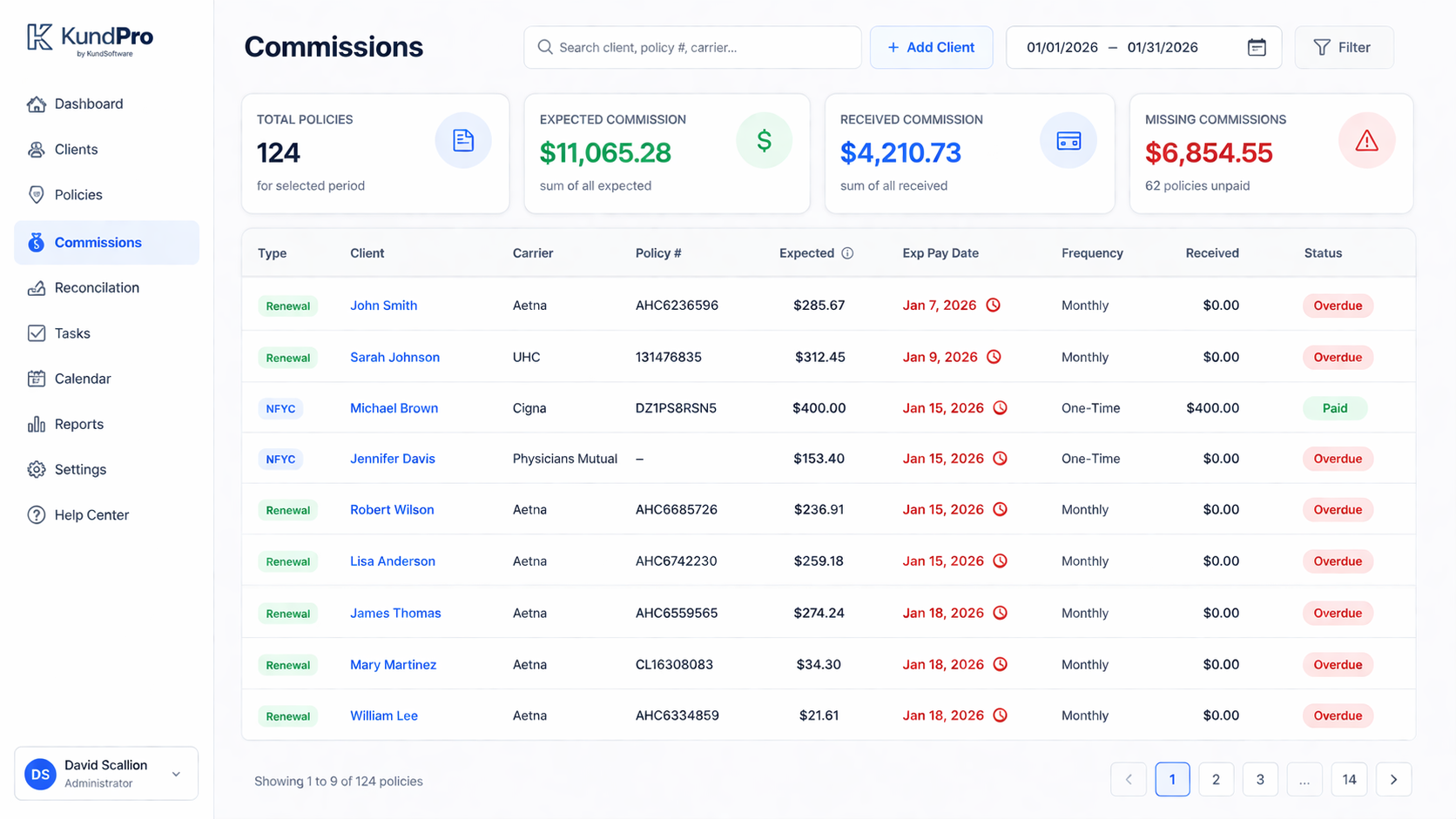
Medicare agents track commissions by recording the expected commission amount and payment date at the time of enrollment, then reconciling actual carrier payments against those expectations in a monthly ledger. This creates a line-by-line system — one entry per policy, per carrier — where every commission is tracked from expected to received, and any discrepancy between the two is visible immediately.
The closest analogy is balancing a checkbook — except instead of your bank account, it is every policy you have ever written, sorted by month, with expected amounts and actual payments side by side. Here is the exact workflow:
The goal: replacing the process of going line-by-line through a carrier statement and a spreadsheet simultaneously. The ledger does that work — expected versus actual, month by month, per policy. Every commission your book should generate is visible before it arrives. Every discrepancy is visible the moment it happens. That is what makes the spreadsheet unnecessary — not because the system automates reconciliation for you, but because it gives you the exact same line-item visibility the spreadsheet gave you, inside the same system where the policy lives.
For the full platform comparison across all categories: best Medicare CRM and AMS for insurance agents →
What commission tracking looks like when it actually works
Most descriptions of commission tracking in Medicare CRMs talk about it in abstract terms: "policy-level," "automated feeds," "reconciliation module." Here is what it looks like in practice, using KundPro's commission workflow as the concrete example — because KundPro is the only platform where agents have described it as "balancing a checkbook."
Why agents describe this as "balancing a checkbook"
A checkbook does not generate a report about your balance. It shows you your balance, updated in real time, one entry at a time. KundPro's commission ledger works the same way: one entry per policy per carrier, expected versus received, open until reconciled. It is the spreadsheet workflow — without the manual row management, without the formula errors, and without the reconciliation living in a file that is separate from the policy record it came from.
The reason this matters for the spreadsheet question: agents who maintain a commission spreadsheet are not doing anything irrational. They are doing exactly the right kind of tracking — at the policy level, carrier by carrier, expected versus received. The spreadsheet is the right tool for that job. It is just the wrong format. A commission ledger that does the same thing inside the CRM removes the need to maintain a second system, without removing the transparency and control that made the spreadsheet trustworthy in the first place.
The spreadsheet is not the problem. The problem is a CRM that cannot do what the spreadsheet does at the policy level. When the CRM can, the spreadsheet becomes unnecessary.
What the exit from spreadsheet dependency actually looks like
Most agents who have made the transition describe it the same way: not as a technical migration, but as a relief. The spreadsheet did not feel like a burden until it was gone. Then they realized how much of their weekly attention it had been consuming.
The transition has three phases for most Medicare agents.
For agents who have felt like the re-entry and reconciliation loop was just part of the job: why Medicare agents are still re-typing client data in 2026 → covers where the fragmentation costs the most time, and what it looks like when a single system eliminates it.
Final thought
The spreadsheet question is not really about spreadsheets. It is about whether the tools Medicare agents are using were designed for how Medicare business actually works.
Most were not. And the spreadsheet is the evidence.
When agents stop maintaining a spreadsheet alongside their CRM, it is not because they changed their habits. It is because they finally have a system that does what the spreadsheet was doing — at the policy level, in real time, without requiring the agent to be the connection between two incomplete tools.
Most CRMs are built for selling. Medicare agents need systems built for managing their book.
If this sounds familiar…
- ✓ You run a spreadsheet next to your CRM
- ✓ You manually check carrier statements against your own records
- ✓ You have found a commission error before
- ✓ You trust your spreadsheet more than your CRM on commission numbers
You don’t have a tracking problem.
You have a system problem. Your tools were not built for how Medicare commission tracking actually works — and you built a spreadsheet to compensate.
Most commission tracking software has the same gap — it records what carriers send, not what carriers owe. See how commission verification catches what tracking misses →
You don’t have a tracking problem.
You have a system problem. Your tools were not built for how Medicare commission tracking actually works — and you built a spreadsheet to compensate.
Ready to close the spreadsheet?
KundPro tracks commissions at the policy level — NFYC and renewals, per carrier, per client, editable in real time. No reporting layer. No parallel spreadsheet. No reconciliation tab. Now in private beta.
Apply for Beta Access →No credit card required • Medicare agents only • Founding pricing locked in for beta users
Frequently asked questions
Common questions from agents evaluating whether to replace their spreadsheet with a Medicare CRM.
Medicare agents use spreadsheets because their CRM does not track commissions at the policy level. Most CRM platforms store contact and policy data but do not record NFYC and renewal commissions tied directly to each individual policy record. The spreadsheet is not a preference — it is a workaround for a specific gap in the tool. Approximately 73% of insurance agents still rely on spreadsheets for commission tracking for this reason.
Insurance agents use spreadsheets to track commissions because most CRM and AMS platforms treat commissions as a reporting layer rather than tying them directly to each policy record. When commissions live in a report, any policy change requires regenerating the report to see the updated number. A spreadsheet gives the agent direct control at the line-item level — one row per policy, per carrier, per client — where reconciliation actually happens. Nearly 90% of audited spreadsheets contain at least one error, which compounds over time as the book grows.
A spreadsheet gives direct control at the line-item level but requires manual entry for every transaction and breaks down as the book scales past 100 to 150 policies. A Medicare CRM that tracks commissions natively ties each commission record directly to the policy it came from, reflects changes in real time, and does not require a separate manual reconciliation step. The key difference for Medicare agents is NFYC versus renewal commission tracking: a spreadsheet can track both but requires manual entry. A CRM built for Medicare tracks both at the policy level automatically, so the record is always current.
For most Medicare agents, the spreadsheet becomes a liability between 100 and 150 active policies. The more reliable signal is behavioral: if you are spending more than two hours per month reconciling commission data, if you have found errors that took time to trace, or if your renewal tracking is running behind because the spreadsheet is not current, the spreadsheet has already become the bottleneck.
Yes, but only if the CRM tracks commissions at the policy level. Most Medicare CRM platforms do not. AgencyBloc tracks commissions through a reporting layer. MedicarePro CRM does not include native commission tracking at the policy level. A platform like KundPro, which ties commissions directly to the policy record from the start, can replace the spreadsheet entirely because it is tracking at the same level of detail — per policy, per carrier, per client — that the spreadsheet was tracking manually.
NFYC stands for New First Year Commission — the commission paid to an agent in the first year a client is enrolled in a plan. Renewal commissions, paid in subsequent years, are typically lower and set by CMS allowable rates that can change annually. For Medicare agents, tracking both NFYC and renewal commissions at the policy level is essential for verifying that carriers are paying correctly on each renewal. A CRM that replaces the spreadsheet must track both separately per policy for the spreadsheet to become unnecessary.
Three costs most agents underestimate: (1) Time — most agents managing 300+ clients spend two to four hours per month on commission reconciliation. (2) Accuracy — nearly 90% of audited spreadsheets contain errors, and commission errors compound over time. (3) Missed commissions — a spreadsheet that requires manual updating is frequently behind, and a carrier that underpays a renewal may go unnoticed for months. Industry analysis suggests agents on spreadsheets miss an estimated 3 to 5 percent of commissions owed annually.
Agents who trust their spreadsheet more than their CRM commission module are responding to systems that are opaque — where commissions are aggregated into reports rather than tracked line by line in a way the agent can audit. A spreadsheet is transparent: every formula is visible, every number traces back to a source. The solution is not automation but transparency at the same level of detail the spreadsheet provided. An agent should be able to see what they expect to receive from every carrier this month, before it arrives, and immediately see whether what arrived matches.
KundPro tracks commissions like a checkbook for your book — expected versus actual, month by month, per policy, per carrier. You enter the expected commission when you write the policy. The ledger shows every expected payment by month. When a carrier payment arrives, you enter what actually came in. If it matches, you reconcile it. If it does not, the ledger shows exactly what is off so you can check with the carrier, correct an entry, or flag a discrepancy to collect. First-year and renewal commissions follow the same workflow. The goal is the same line-item visibility the spreadsheet gave you — inside the system where the policy actually lives.
Spreadsheets do not provide audit trails, access controls, or secure storage that CMS compliance documentation increasingly requires. The more significant compliance gaps are in client interaction documentation and Scope of Appointment tracking, which spreadsheets cannot handle. For commission tracking specifically, the primary risk is business risk rather than regulatory risk: errors and gaps in manual reconciliation can result in months of missed payments that are difficult to recover retroactively from carriers.
KundPro uses a commission ledger sorted by month — structured like a bank statement for your policies and commissions. When you enroll a client, you enter the expected commission amount and expected payment date directly on the policy record. When the carrier pays, you enter what you actually received and when. The system shows expected versus received side by side for every policy on that statement. If the amounts match, you reconcile it. If they do not — carrier underpaid, missed a month, adjusted a rate without notice — the discrepancy is flagged with the documentation you need to contact the carrier. Applies to both NFYC and renewal commissions. Agents describe it as balancing a checkbook: one entry per policy, expected versus received, open until reconciled.
Commission forecasting means seeing what you expect to receive from each carrier in any given month before the statements arrive — based on the policies currently in force, the commission rates on those policies, and their expected payment schedules. A CRM with commission forecasting built into the policy record shows you total expected commissions for any month across all carriers, identifies months where a carrier payment is lower than expected (possible lapse), and surfaces gaps between forecast and received without a manual reconciliation step. A spreadsheet can do this but requires the agent to maintain the forecast manually — updating rates when CMS changes them annually, removing lapsed policies, adding new ones. A policy-level system maintains the forecast automatically as the book changes.